The last thing a recorder writes
Someone opens a post with a video in it and presses play. The connection is fine. The video is not large. Nothing happens for a while, and then the video starts all at once, as if it had been waiting for permission.
It had been waiting for the index.
Why it sits at the end
An MP4 is a handful of boxes laid end to end. One of them, mdat, is the picture and the sound. Another, moov, is the index: which frame is at which byte, how long the thing runs, what codec to hand it to. A player needs moov before it can show a single frame.
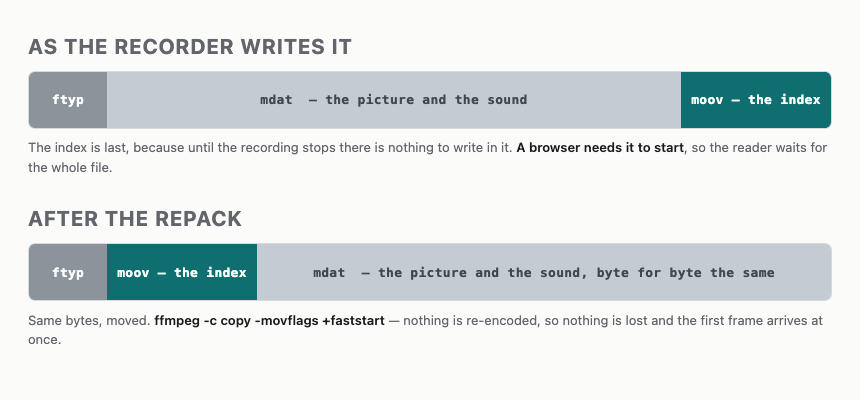
A recorder cannot write moov until the recording stops: until then it does not know what will be in it. It writes the picture first and the index last. Every phone does this, and so does the share sheet that repacks what the phone recorded. The file is correct and it plays. It only makes the reader download all of it to see the first second.
Moving that index to the front is one flag of one program. What was missing was anything in the engine that knew the question existed.
Reading where it sits
lib/video_probe.rb walks the file's top-level boxes, reading the four-byte length and four-byte name of each and seeking past the body. No ffprobe, no gem -- the same box walk that already reads a video's frame size. If moov comes before mdat, the file starts fast. If it comes after, it does not.
A counter around File#read, on a forty-megabyte file with its index at the end: twenty-four bytes. Three box headers. The forty megabytes between them are never touched.
It answers nil, not false, when the question does not arise -- no moov, no mdat, nothing it can parse. "I cannot tell" and "badly ordered" are different answers, and running them together would report a fault about every unreadable file. The walk also refuses to descend: an mdat is full of bytes that can spell anything, including a box header spelling moov.
Moving it on the way in
media: remux_video: true in config/site.yml, and the engine repacks a video as it is attached:
ffmpeg -nostdin -loglevel error -y -i IN -c copy -movflags +faststart OUT-c copy is the whole of it: the picture and the sound are copied across as bytes, nothing re-encoded, nothing decided about quality. +faststart writes the index first. A QuickTime .mov comes out .mp4 while it is there, because some browsers decline the container whatever is inside it. An .mp4 that gets repacked comes out 01-web.mp4 rather than 01.mp4: the same name is offered when an author runs ffmpeg by hand, and ffmpeg refuses its own input.
A repack counts as done only if ffmpeg left cleanly and left a file with bytes in it: a tool that dies halfway leaves a truncated file and can still exit happy, so the status alone is not an answer.
This was exercised against thirty real videos out of a working archive with ffmpeg 7.1. Three carried the index at the end. All thirty came out fast-start, and every one kept its duration, which is what proves the copy is a copy.
The ones already in the archive
check opens the videos an archive already holds and names the ones with the index at the end, by post and by file:
klip: the video 01.mp4 carries its index at the end of the file.Beside each it prints the repack command -- in outline, with FILE where the name goes -- and the setting that does it on future saves. It is a warning, not an error: check leaves with zero and counts it worth a look rather than a problem. The file is not broken. It is slow, and slow is the author's to decide about.
On a save the same sentence appears only where the two older notices have nothing to say. An HEVC clip and a .mov already come with a command that moves the index as a side effect, and a third command for one file is a third thing to weigh.
What it refuses to do
It needs ffmpeg and does nothing without it. With the setting on and no ffmpeg on the machine, the save says the repack was skipped and stores the file as it arrived.
A repack that fails is not a refusal either. The post is saved, the video goes in as it came, and the author gets the sentence they would have had with the setting off. That is the difference from the HEIC conversion, which does refuse: a HEIC photo displays in Safari and nowhere else, while a video in the wrong wrapper still plays for nearly everybody.
check fixes nothing. It prints the command, and running it is a person's job.
It is off by default, like everything else here that shells out to a tool the engine does not ship.
What it costs
Installing ffmpeg once. On save, the time it takes to copy one file: the cost follows the size of the video, not the length of an encode that never happens. And nothing on the archive already on disk until the commands check hands over are typed, one video at a time.
Comments